API usage
Spamexx provides an HTTP API that lets you check programmatically:
- Threat lookup – query an indicator (domain, email, IP, URL or hash) against the Spamexx threat database.
- Content check – run a message through the spam and virus check and get a verdict.
- Plan limits & usage – query the limits of your booked plans and the current usage (without consuming quota).
Base URL: https://api.spamexx.com
Authentication
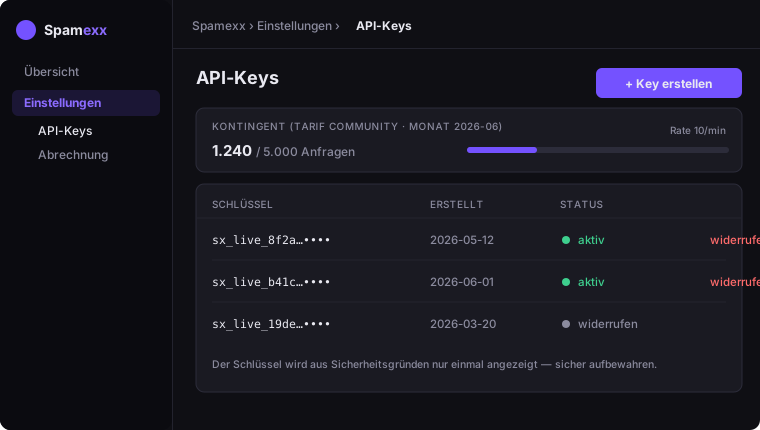
Create an API key under Settings → API keys. For security the key is shown only once – store it safely.
Send it on every request in the Authorization header:
Authorization: Bearer sx_your_keyQuota (requests/month) and rate limit (requests/minute) follow your API plan. Without a booked API plan the free tier applies. You can see your current usage under Settings → API keys.
Threat lookup
POST /api/v1/check/lookup
Request body:
{ "type": "domain", "value": "example.com" }type is one of domain, email, ip, url, hash.
Response:
{ "verdict": "clean", "score": 0.0, "matched": false }verdict–clean,suspiciousorspamscore– reputation value between 0 and 1matched– whether there was a hit in the threat database
Example:
curl -X POST https://api.spamexx.com/api/v1/check/lookup \
  -H "Authorization: Bearer sx_your_key" \
  -H "Content-Type: application/json" \
  -d '{"type":"url","value":"http://suspicious-domain.example/path"}'
Content check
POST /api/v1/check/message
Send either the full raw message or individual fields.
Full message (recommended – with all headers for the most accurate result):
{ "raw": "<RFC 822 message as text or Base64>" }Individual fields:
{ "from": "sender@example.com", "subject": "Subject", "body": "Message text", "source_ip": "203.0.113.5" }Note: For an accurate result send the full raw message with headers where possible. A minimal message without headers may score higher simply because standard headers are missing.
Response:
{ "verdict": "deliver", "score": 2.1, "is_spam": false, "is_virus": false }verdict–deliver,quarantine(spam) orreject(virus)score– aggregated check scoreis_spam/is_virus– classification flags
The submitted content is checked only transiently and is never stored or logged.
Plan limits & usage
GET /api/v1/limits
Returns the tariff limits per product line assigned to your API key, together with the current usage. This call does NOT consume quota (own limit 60/min) — ideal for checking remaining quota before a run or displaying it in your app.
curl https://api.spamexx.com/api/v1/limits \
  -H "Authorization: Bearer sx_your_key"
Response (lines that are not booked are omitted):
{
  "tenant_id": "…",
  "period": "2026-06",
  "unlimited": false,
  "api":   { "plan": "Community", "requests": { "used": 0, "max": 5000 }, "remaining": 5000, "rate_per_min": 10 },
  "saas":  { "plan": "Enterprise", "domains": { "used": 1, "max": 50 }, "mailboxes": { "used": 6, "max": 500 }, "retention_days": 365 },
  "spool": { "plan": "Basic", "domains": { "used": 0, "max": 3 }, "spool_retention_hours": 72 }
}api– API quota:requests.used/requests.max(month),remaining,rate_per_min.saas– Online/SaaS:domainsandmailboxeseachused/max,retention_days.spool– Backup/Failover:domains(used/max),spool_retention_hours.max: 0means unlimited;unlimited: truelifts all limits;periodis the billing month of the usage counter.
Note: Hard quota enforcement still happens on the check endpoints (429 when exhausted). The usage values reported here are informational.Errors & limits
401– key missing, invalid or revoked.429– rate limit (requests/minute) or monthly quota reached.503– check temporarily unavailable (retry later).
Need more quota? Switch your API plan or build a custom plan under Billing.