Add a domain & switch MX
For Spamexx to filter mail for your domain, add the domain and point your MX record to Spamexx.
1. Add the domain
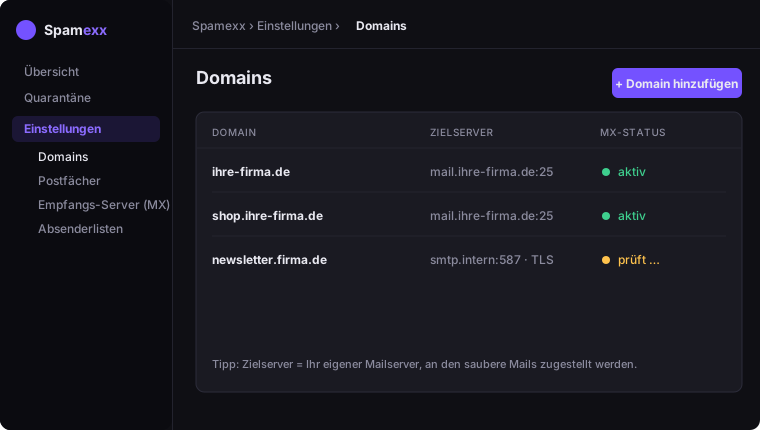
Open Settings → Domains and click Add domain. Enter:
- Domain name – e.g.
your-company.com - Destination server – your actual mail server that clean mail is delivered to (host, port, optional TLS)
2. Set the MX record
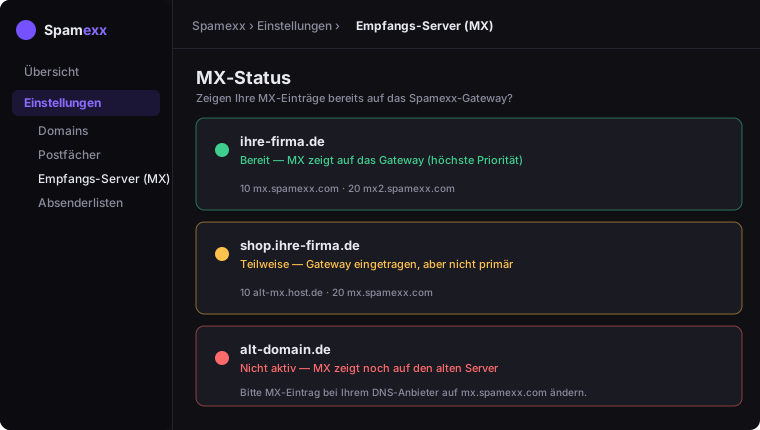
Find the correct MX hostnames under Settings → Inbound servers (MX). Add them as your domain's MX record at your DNS provider and remove old MX records that still point directly to your mail server.
3. Verify
Send a test e-mail to an address on your domain. The dashboard and logs show whether it arrived through Spamexx. DNS changes can take minutes to hours to propagate.